
DIY Locker: School Decor
What is DIY Locker: School Decor?
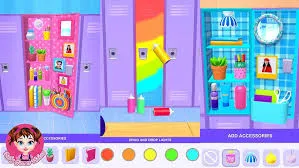
DIY Locker is a creative Aesthetic-Composition and Spatial-Arrangement simulation. The technical logic focuses on "Interior Asset Layering," where players customize a restricted 3D space using stickers, wallpapers, and organizational tools. It is designed for fans of interior design and "organization-porn" who find satisfaction in personal expression through a clean, structured visual environment.
Description
Customize a high-school locker using a variety of stickers, wallpapers, and organizational tools. The simulation focuses on aesthetic composition and spatial arrangement for personal expression.
How to Play
You are presented with an empty school locker. Your goal is to transform it into a personalized sanctuary. Interaction involves selecting items from the tray—such as mirrors, magnets, and shelves—and dragging them into the 3D space. You can apply wallpapers to the back and side panels. You must account for "Spatial Efficiency"—arranging books and accessories so they fit logically within the locker's dimensions. Once finished, you can "Close the Door" and see your custom nameplate.
How to Get High Scores in DIY Locker: School Decor
Achieving a "Top-Tier Aesthetic" depends on "Color-Coordination and Symmetry." Instead of adding random stickers, choose a "Base Palette" (e.g., Pastel Pink or Neon Blue) and stick to it for all major assets. A pro tip is to utilize the "Depth-Layering" technique—placing wallpapers first, followed by functional shelves, and finally small foreground accessories like pens or photos. This creates a realistic "Lived-In" look that maximizes the "Creative Score" in the final review.
Frequently Asked Questions
Q: Can I resize the stickers?
Yes. Tapping a sticker allows you to use a "Scale Slider" to make it fit perfectly on small surfaces like the inside of the door or the edges of a shelf.
Q: Is there a limit to how many items I can add?
While there is no hard numerical limit, the physical volume of the locker is fixed. If items overlap too much, they will look cluttered; use the "Snap-to-Grid" feature to keep your arrangement clean.
Recommended for You
Princess Castle
Crazy Hand Doctor

Sweet Baby Girl Summer Fun

Health Check Simulation
Baby Taylor Home Cleaning
Makeup Kit Color Mixing
Kinghts Princess Arcade Game
Beauty Salon

Baby Panda: Chinese Holidays
Mermaid Kingdom Rescue
Princess Makeup
Glow Halloween Nails
Hippo Wedding Party
Kitty Kate: House Cleanup
Housework Simulation
Glitter Lips Artist
Sailor Girl Battle Outfit

Cat Girl Christmas Decor
Baby Rescue Team
Baby Educational Phone
Avatar Love Story

Monster Spa & Makeover
Phone Case DIY

Sweet Princess Wedding
Art Book
Hotel Decor
Makeup Stack
Princess Color By Number
Ice Princess Beauty Salon
Relaxing Spa Day

Baby Panda Photo Studio
Princess Makeup Studio
ASMR Mukbang Live
Popular Hair Salon
Pet Makeup Master
Princess Salon
Nails Art: Salon
Donut Cooking Game
Christmas Cupcake Maker
Toy Kitchen Set
Cat Girl Halloween Prep
Pizza Maker Master Chef
Baby Taylor Sushi Cooking
Dream Cake Maker

Kids Pizza Chef
Anime Girl Dress Up
Christmas Cooking Traditions

Animal Ice Cream Shop
Colorful Braid Hairstyle Making
Fashion Design Studio