
Fashion Tattoo Studio 4
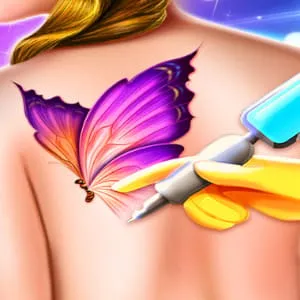
What is Fashion Tattoo Studio 4?
What is Tattoo Studio 4?Tattoo Studio 4 is a high-fidelity "Ink Artist" simulation that captures the precision and artistry of professional tattooing. It moves beyond simple coloring to focus on the technical aspects of the craft, including needle pressure, line work, and shading. It’s the ultimate creative playground for players who appreciate "Body Art" aesthetics and want to master the steady-hand mechanics required for intricate, permanent designs in a virtual parlor.
Description
Get inked! Choose the coolest designs and carefully apply beautiful tattoos to your clients in this artistic studio simulation.
How to Play
How to play Tattoo Studio 4?The game follows a professional 4-step tattooing process. First, "Placement"—drag the stencil onto the customer's arm, leg, or back. Second, "Outlining"—carefully trace the blue guide lines with the tattoo machine; moving too fast will cause ink bleeds. Third, "Shading and Coloring"—select colors from the palette and use the "Soft Brush" for gradients. Finally, "Aftercare"—clean the area and apply a protective wrap. Each step is interactive, requiring you to hold the mouse button to operate the vibrating needle.
How to Get High Scores in Fashion Tattoo Studio 4
How to get high scores in Tattoo Studio 4?The "Stencil Accuracy" score is your primary metric. To get a high score, keep your "Needle Pressure" in the green zone to avoid the "Ink Splatter" penalty. For the shading phase, using "Tonal Gradients" (blending light to dark) provides an "Artistic Depth" bonus. Successfully completing a tattoo with 98% line accuracy triggers the "Master Ink" multiplier, which significantly boosts your studio's reputation and unlocks premium neon ink sets.
Frequently Asked Questions
Q: Can I design my own tattoos?
Yes, once you reach "Senior Artist" rank, the "Freehand Mode" is unlocked, allowing you to draw without stencils.
Q: What happens if I go off the lines?
The customer's "Satisfaction Meter" will drop, and you may have to use the "Laser Eraser" tool to fix the mistake, which costs coins.
Recommended for You

Ice Princess Wedding Day
Fashion Queen Dress Up

BFFs Christmas Eve

Winter Fashion Dress Up

Fashion Friends Reunion
Princess Salon
Perfect Lip Art Salon
Paper Doll
Superhero Tutu Outfits

Fashion Doll Closet

Spring Casual Fashion
Fashion Nail Art DIY Blog
Summer Swimsuit Design
Easter Nail Designer
Fashion Flowers DIY
Korean Supermodel

Short Hair Fashion Salon
Money Honey: Choice Run

Long Hair Princess Salon

Makeup Show Makeover Salon
Baby Tailor: Clothes Maker
Fashion Pony Studio
Black Friday Shopping

Superstar Makeup Party

Little Panda Princess Dress Up

Selfie Make Up

Modern College Fashion

Flower Girl Wedding Day

Color Skirt Tryout

Anime Girl Dress Up

High School Summer Crush Date
Cat Girl Halloween Prep

Fashion Dress Trend for Hawaii
Makeup Artist: Fashion Salon
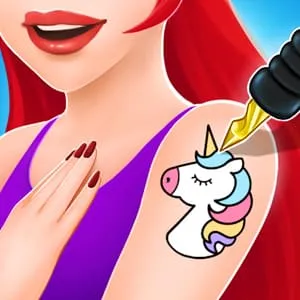
Animal Tattoo Studio
Dream Doll Boutique
Royal Halloween Party

Angela: All Season Fashion
Diy Makeup Artist

Pet Tailor Studio
Glitter Dress Coloring
Fashion Design Studio
BFF Easter Photobooth

E-Girl vs Soft-Girl

Dream Wedding Planner
Baby Pop Stars

Princess Makeup
Glitter Dress Coloring
Pro Eye Makeup Artist
Pimple Treatment Makeover Salon