Start
Press Play Now and wait for the game to load in the browser player.
Press Play Now and wait for the game to load in the browser player.
Use mouse, keyboard, or touch controls depending on the game and your device.
Follow the in-game objective, improve your score, and replay to master each level.
Original game information helps players decide whether this game fits their session.
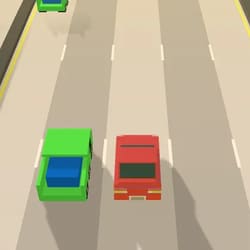
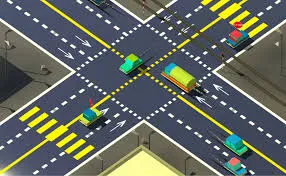
Traffic is a "Time-Management Intersection Simulator" that focuses on Flow Control and Queue Theory. This title places the player in the role of a traffic controller at a busy four-way junction. It emphasizes "Collision Prevention" over speed. It is a game of "Patience and Observation," where the player must manually start and stop streams of vehicles to ensure that the "Congestion Meter" doesn't overflow while preventing catastrophic T-bone collisions.
Clear instructions make the page more useful and reduce quick bounces.
Tap on individual cars to make them "Sprint" through the intersection, or tap traffic lights to change their state. The gameplay is a Crisis Management challenge: cars arrive from all four directions. You must find "Gaps" in the cross-traffic to let vehicles through. If cars wait too long, their "Frustration Icon" turns red; if the intersection clogs up completely, the level fails. You must successfully pass a specific number of cars to advance.
Strategy content gives players a reason to read, replay, and explore similar games.
High scores are dictated by Flow Efficiency. Passing cars in "Bunches" (letting 5 cars from the same lane go at once) grants a "Conductor Bonus." The pro secret is "Prioritization"—letting the faster sports cars through first so they don't get stuck behind slow trucks, which keeps the "Average Speed" of the intersection high. Achieving a "Zero-Accident" week in-game yields a "Safety Inspector" multiplier.
Quick facts for players who scan before they start a game.
Start directly in your browser without installation.
Play on H5Joy without paying for access.
Designed for browser play across common devices.
Enjoy a focused session at your own pace.
Part of the racing games collection.
Find similar games after you finish a round.
Useful facts for players and clearer context for search engines.
Questions real players may ask before starting or replaying this game.
Generally, no; once a car starts its "Sprint," it will commit to the intersection. You must time your "Go" commands carefully.
Ambulances and Fire Trucks will occasionally appear; they cannot be stopped and you must clear all other traffic to give them "Right of Way."
Yes. Traffic Control can be played for free in your browser on H5Joy.
No download is required. Open the game page and start playing directly in your browser.
Many H5Joy games are mobile friendly. If this game supports touch controls, it can be played on phones and tablets as well as desktop browsers.
Try the related racing games listed on this page for similar themes, controls, or play styles.
Keep players exploring with related games from the same category and similar tags.