
Princess Color By Number
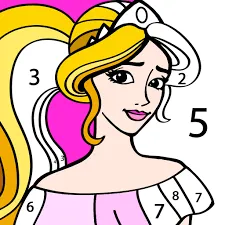
What is Princess Color By Number?
Princess Color By Number is a structured digital art experience designed for precision and meditative focus. The technical logic centers on "Numerical Color Mapping," where complex illustrations are divided into specific segments identified by code. It is tailored for fans of "Coloring Apps" who enjoy the satisfaction of completing intricate designs through a patient, step-by-step process.
Description
Fill in intricate princess-themed illustrations by matching numerical codes with specific color palettes. This experience focuses on precision and patience through a structured coloring system.
How to Play
Select an uncolored princess illustration from the gallery. Your goal is to fill the entire image with color. At the bottom, you will see a palette with numbers; tap a number, and the corresponding areas on the image will be highlighted. Simply tap those areas to fill them with the assigned color. Use the "Zoom" tool to find tiny, numbered segments that are hidden in the dress textures or background details.
How to Get High Scores in Princess Color By Number
Maximizing your "Artistic Efficiency" depends on "Color-Batching." Instead of switching numbers frequently, "Clear One Color Completely" before moving to the next. The game provides a "Progress Indicator" for each number; once a color is 100% applied, it will disappear from your palette. A pro tip is to use the "Magic Wand" power-up on very complex segments—this automatically fills all remaining spots of a specific number, helping you achieve a perfect completion time.
Frequently Asked Questions
Q: Can I change the assigned colors?
In the standard mode, the numbers are fixed to specific palettes. However, once an image is completed, you often unlock "Custom Mode" where you can re-color the entire illustration with your own color choices.
Q: What if I can't find a tiny segment?
Tapping the "Search Lamp" icon will auto-zoom the camera onto the smallest remaining uncolored segment for the currently selected number, ensuring you don't get stuck at 99%.
Recommended for You
Phone Case DIY
Popular Hair Salon
Baby Educational Phone

Baby Panda: Chinese Holidays
Glow Halloween Nails
DIY Locker: School Decor
Makeup Kit Color Mixing

Sweet Princess Wedding
Avatar Love Story
Baby Taylor Home Cleaning
Princess Makeup Studio
Pet Makeup Master

Sailor Girl Battle Outfit
Glitter Lips Artist

Sweet Baby Girl Summer Fun
Monster Spa & Makeover
Ice Princess Beauty Salon

Health Check Simulation
Princess Makeup
Makeup Stack
Relaxing Spa Day
Art Book
Hippo Wedding Party
Nails Art: Salon
Princess Salon
Cat Girl Christmas Decor
Baby Rescue Team
Princess Castle
Baby Panda Photo Studio
Housework Simulation
Kitty Kate: House Cleanup
Kinghts Princess Arcade Game

Beauty Salon

Mermaid Kingdom Rescue

Hotel Decor
ASMR Mukbang Live

Crazy Hand Doctor
Paper Doll
Color Skirt Tryout

Ice Cream Summer Fun

Fashion Friends Reunion
Christmas Cupcake Maker
Pizza Maker Master Chef
Fashion Queen Dress Up
Baby Taylor Christmas Dress Up
Glitter Dress Coloring
Royal Halloween Party
Fidget Spinner Fashion
Pizza Maker

Swirly Icy Pops DIY