
Silhouette Art
What is Silhouette Art?
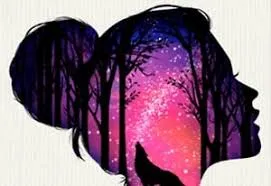
Silhouette Art is a Negative Space and Luminance Contrast game focusing on Layered Stenciling. This title involves creating a complex image by applying paint over a series of masks. It emphasizes "Visual Subtraction," where the beauty of the final piece is revealed only after the "Final Peel" of the stencil. It is a game of "Atmospheric Grading," where the player uses gradients to simulate sunsets, galaxies, or foggy forests.
Description
Create stunning masterpieces using the unique art of silhouettes. Layer colors and remove stencils to reveal beautiful sunset scenes and iconic landscapes in this simple yet visually striking creative game.
How to Play
Apply a stencil mask → Spray paint → Remove mask → Repeat. The gameplay is Inverse Composition: you build the background first and the silhouette last. Interaction involves "Gradient Blending"—overlapping two colors to create a "Soft Edge" transition. The final step is always the "Satisfying Reveal," where you remove the black masking tape to show the clean borders.
How to Get High Scores in Silhouette Art
High scores are earned through Color Harmony and "Over-Spray" Management. Using complementary colors for the sky (e.g., Orange and Purple) maximizes the "Aesthetic Rating." The pro secret is "Edge Crispness"—ensuring you spray the "Outline Zone" of the stencil thoroughly to avoid "Feathering" when the mask is removed. Reaching the "Gallery Exhibition" stage unlocks "Glitter Spray" effects.
Frequently Asked Questions
Q: Can I undo a spray?
Yes, but it's usually better to "Paint Over" with a corrective color to maintain the gradient's depth.
Q: Why does the final image look messy?
You might have removed the stencils in the wrong order. Always follow the "Lower-to-Upper" layer sequence shown in the tutorial.
Recommended for You
Grima Monster: DOP
Park Master
Bazooka Boy: Physics Blast
Draw The Hill
Happy Glass: Physics Draw
Save The Pets
Draw Climber Rush
Draw Defence: Ink War
Fill The Water: Line Draw
ASMR Drawing

Draw Logic
PC Artistic Lab
Draw Joust Duel
One Line Path Sort
Save The Doge
Save The Dog: Bee Hive
Shoot & Paint Art
One Touch Drawing Brain Puzzle
Line on Hole: Path
Brain On Line
Color Maze Puzzle

Get The Stars: Physics Draw

Love Balls: Draw Lines
Draw Rider
Stencil Art
One Line Draw
Idle Trampoline Master
Save Man: One Line
Layer Paint Sort
Mobile Coloring Book
Draw & Save Puzzle
One Line Draw
Save My Hero: Draw Guard
Rope Star
Save The Doge

Letter Link Lab
Letter Rescue Sort
Rapid Dice Sort
Junior Math Quest
Find IT Hidden Object
Make Ten: Math Logic
Wordle Brain Puzzle
Brainrot: Differences
Digit Word Smith
Skyward Word Search
Find Out: Hidden Objects
Math Pup: Truck Counting
Whooo: Guess the Character
Advanced Math Fun
Halloween Memory