
Stencil Art
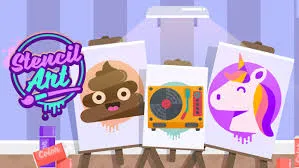
What is Stencil Art?
Stencil Art is a Layered Pigment and Masking simulator focusing on Inverse Composition. Similar to physical street art, this title requires the player to apply cut-out templates and spray paint in a specific sequence. It emphasizes "Color Grading" and "Edge Definition," where the beauty of the final image depends on the contrast between the spray's "Soft Edges" and the stencil's "Hard Outlines."
Description
Master the technique of stencil painting! Choose your templates, apply layers of spray paint, and peel back the masks to reveal professional-looking artwork in this clean and addictive digital art studio.
How to Play
Select a stencil, place it on the canvas, and drag the spray can to apply paint. The gameplay is Iterative Masking: apply Layer 1, peel the stencil, apply Stencil 2, and spray the next color. Interaction involves "Coverage Management"—you must ensure 100% of the cut-out area is saturated before moving to the next layer. The final step is the "Grand Reveal" where all stencils are removed.
How to Get High Scores in Stencil Art
Elite scores are achieved through Gradient Smoothness. Using "Short Bursts" of paint to blend two colors (e.g., Sky Blue to Sunset Orange) inside a single stencil area yields an "Artistic Flair" bonus. The pro secret is "Over-Saturation Prevention"—spraying too much in one spot can cause "Digital Drips." Aim for an even, medium-speed pass across the entire template.
Frequently Asked Questions
Q: Why does my final image look blurry?
You may have missed a corner of the stencil. Ensure the "Completion Meter" hits 100% for each color before moving to the next layer.
Q: Can I change the stencil order?
No, the order is optimized for "Visual Layering." Reversing it would cause the foreground elements to be buried under the background paint.
Recommended for You
Grima Monster: DOP
Draw Climber Rush
Save My Hero: Draw Guard
Idle Trampoline Master
Draw & Save Puzzle
Save The Dog: Bee Hive
Happy Glass: Physics Draw
Draw The Hill
Save The Pets
Mobile Coloring Book
Save Man: One Line
Layer Paint Sort
Draw Joust Duel
Save The Doge
Park Master
Shoot & Paint Art

Love Balls: Draw Lines
One Line Draw
One Line Path Sort
Bazooka Boy: Physics Blast
Rope Star

Get The Stars: Physics Draw
One Touch Drawing Brain Puzzle
ASMR Drawing
Draw Logic
Silhouette Art
One Line Draw
Draw Rider
Save The Doge
Color Maze Puzzle
Line on Hole: Path
Brain On Line
Draw Defence: Ink War
Fill The Water: Line Draw
PC Artistic Lab
Rapid Dice Sort
Hidden Words: Search
Hangman
Visual Crossword
Make Ten: Math Logic
Junior Math Quest
Sudoku: Logic Master
Kids Math: Fun Learning

Easter Memory
Math Pup: Truck Counting
Digit Word Smith
Find IT Hidden Object
Botanical Word Link
Supermarket Cashier 3D
Find It: Hidden Object